


DANA Indonesia Digital Wallet
4.53.37K Reviews
App Specs
- Version
- 2.128.0
- Updated On
- License
- Free
- Downloads
- 100,000,000+
- Developer
- PT Espay Debit Indonesia Koe
- Categories
- Finance
- Platform
- Android, iOS
Screenshots
 Analysis by AppCompare
What matters most to me about a digital wallet is whether it can shorten an ordinary payment without making the process feel confusing. That is the main appeal I see in DANA Indonesia Digital Wallet: it puts cashless payments and other routine money tasks on a phone, so I can handle them without first looking for a physical wallet. It is a finance app from PT Espay Debit Indonesia Koe, and its focus is practical rather than flashy.
When paying by QR becomes the useful part
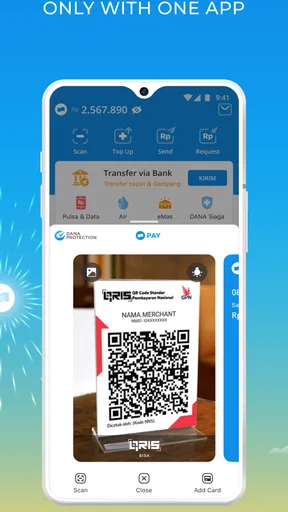
The clearest everyday example is paying at a counter that accepts a QR payment. Instead of sorting through cash or reaching for a card, I can open the wallet, scan the merchant’s code, check the payment details, and confirm. That last pause matters: I treat the confirmation screen as a chance to check the amount and recipient, not as a step to tap through automatically.
This is most useful when I already have my phone in hand and want to keep a small transaction moving. It can also help me avoid carrying cash for every quick purchase. But a phone-based payment still depends on having the phone available, enough battery, and a payment method or balance that is ready to use. I would keep a backup option for situations where a shop does not accept QR payments or my phone is unavailable.
How I would fit it into a normal day
Imagine stopping for lunch, scanning the payment code at the counter, and then using the same app later to check a bill or send money to someone. The value is not that every part of personal finance suddenly becomes effortless; it is that several small tasks can live in one place. I find that more convincing than treating a wallet as a replacement for every bank service.
For a smoother routine, I would open the app before reaching the front of a busy queue, make sure I am signed in, and review the transaction before confirming. After paying, I would check the transaction record if I needed to remember what I spent. This is a modest habit, but it makes a wallet more useful as a practical record rather than just a payment button.
One trade-off is that a digital receipt is only helpful if I can find it later. I would use the transaction history to verify a payment when there is any uncertainty, and avoid assuming that a screen showing a completed action is the same thing as checking the final record. For shared expenses, I would also confirm the recipient and amount before sending; a fast transfer is still a money transfer, and speed is no substitute for care.
What is DANA Indonesia Digital Wallet?
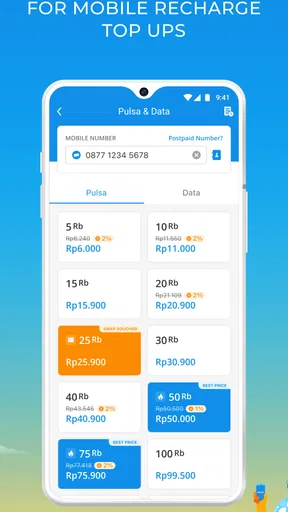
The DANA Indonesia Digital Wallet is a financial app that allows you to perform various transactions directly from your smartphone. Whether you need to pay bills, transfer money, or top-up your phone credit, DANA has got you covered. It's like having a mini bank in your pocket, which is pretty neat if you ask me.
Worth Reading Before You Choose

Flipboard Shows What News Apps Must Do Beyond the Feed

Switching to Android Auto Means Rethinking Your Driving Routine

Google Calendar Makes a Crowded Week Easier to Manage

Ludo King Makes the Most of the Minutes Between Plans

Baby Panda World Brings Quick Play to Modern Phones, but Its Game Library Feels Busy

ESPN’s Live Game View Makes Following Close Games Easier
Setting Up Your DANA Wallet
Getting started with DANA is a breeze. All you need to do is download the app from the Google Play Store or the Apple App Store. Once installed, you'll be prompted to register using your phone number. The app sends a verification code, and voila, you're in!
One thing I appreciated about the setup process was how user-friendly it was. No unnecessary steps or complicated jargon. Just straightforward instructions that anyone can follow.
Features That Stand Out
DANA is packed with features that make managing your finances a walk in the park. Here are a few that caught my attention:
- QR Code Payments: This feature is a game-changer. You can pay for goods and services by simply scanning a QR code. It's fast, secure, and saves you the hassle of carrying cash around.
- Bill Payments: Paying bills has never been easier. From electricity to water and even internet bills, DANA allows you to settle them all in one place.
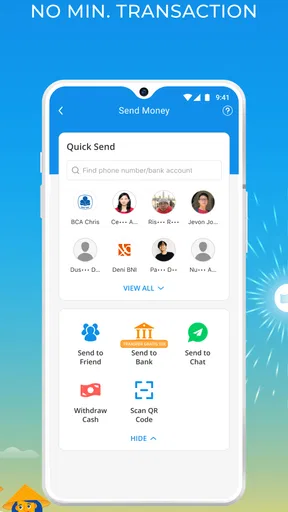
- Transfer Money: Need to send money to a friend or family member? With DANA, you can transfer funds instantly without any fuss.
- Financial Insights: Keep track of your spending with detailed insights into your transactions. It's like having a personal financial advisor at your fingertips.
Using it without losing track
A useful way to approach the bill and transfer tools is to give each transaction a quick purpose check before confirming it. For a bill, I would match the details on screen against the bill I intend to settle; for a transfer, I would verify the recipient rather than relying on a familiar name alone. Those small checks are especially worthwhile when I am moving quickly between tasks.
The same discipline helps with spending. A wallet can make payments feel almost invisible, so I would review the history periodically instead of trusting memory. That is useful for spotting a duplicated payment or simply understanding where small purchases went. I would not treat an app’s transaction view as a full household budget by itself, but it can make day-to-day activity easier to inspect.
User Experience
The user interface of DANA is sleek and intuitive. The developers have done a fantastic job of keeping things simple yet functional. Navigating through the app is a breeze, and everything is where you'd expect it to be.
I also appreciate the regular updates that bring in new features and improve existing ones. It's clear that the DANA team is committed to providing the best experience for their users.
Where it fits beside other payment choices
Compared with paying in cash, DANA can spare me the need to carry exact change and gives me a digital transaction record. Compared with a bank card, it keeps the payment flow on my phone and can be convenient when a merchant offers a QR route. A bank’s own app may still be a better choice when I want banking tools tied directly to my account, while cash remains the dependable fallback where phones or digital payments are not practical.
That distinction helps set expectations: I see DANA as a useful everyday wallet, not a reason to abandon every other way of paying. People who already prefer a single bank app for all transfers and account management may not want another financial app in their routine. Likewise, anyone who is uncomfortable confirming payments on a phone may feel more at ease using cash or a card.
There is also a small but important habit difference. With cash, I can see what is left in my hand; with a wallet, I need to look at the app to keep a clear sense of spending. I would make a quick history check part of my routine, particularly after several small purchases. That helps preserve the convenience without letting phone payments become too easy to forget.
Security
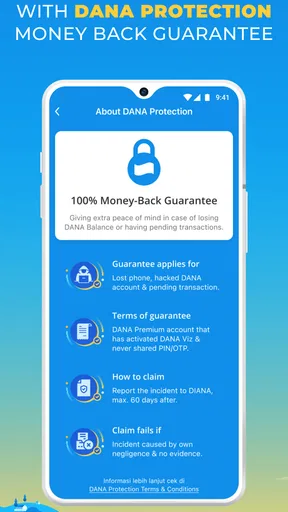
When it comes to financial apps, security is a big deal, and DANA doesn't disappoint. The app uses top-notch encryption to ensure your data is safe and secure. Plus, you can set up additional security measures like PINs or fingerprint authentication for extra peace of mind.
Practical limits to keep in mind
For me, the main limitation of any wallet-based payment is dependence on a working phone and a suitable payment situation. If the device is out of charge, I cannot use it to pay; if a merchant does not support the method I need, another payment option is necessary. That makes DANA most comfortable as part of a small toolkit, rather than the only way I carry money.
I would also avoid rushing through security prompts just because I use the app often. A PIN or fingerprint check is useful only if I take it seriously, and I would keep my phone’s own lock enabled as well. Before confirming a payment in a public place, I would check the amount and recipient discreetly. Convenience should not mean ignoring the details of a financial transaction.
For a first-time user, the practical question is whether the app supports the tasks they actually do: paying participating merchants, handling their bills, topping up phone credit, or sending money. If those are regular needs, a wallet can reduce friction. If they rarely arise, installing another finance app may add little value. I would decide based on the transactions I expect to make, not on the promise of having every money tool in one place.
Who is likely to get the most from it?
I think DANA is a good fit for people in Indonesia who regularly make phone-based payments and want bill payments, transfers, and mobile credit top-ups close at hand. It may also suit someone who wants a transaction history for routine spending but does not need a more involved personal-finance system. Its free price makes trying it less of a commitment, though the usefulness still depends on whether its payment options match the places and services a person uses.
It is less compelling for someone who prefers cash, rarely pays digitally, or wants all financial activity to remain inside an existing bank app. I would also recommend keeping a second payment method available rather than relying on a single phone for every purchase. The best use is as a convenient option for suitable transactions, with a moment to review details before money moves.
DANA is rated for Everyone, has an average rating of 4.5 from around 10 million ratings, and has passed over 100 million installs. Those figures suggest that it is widely used, but they do not tell me whether it will suit a particular person’s habits; the more useful test is whether its everyday payment flow fits your routine.
Conclusion
In a world where convenience is king, the DANA Indonesia Digital Wallet stands out as a reliable and efficient tool for managing your finances. Whether you're paying for lunch or settling your monthly bills, DANA makes the process seamless and hassle-free.
If you haven't tried it yet, I'd highly recommend giving it a go. It's available for both Android and iOS, so there's no excuse not to join the digital wallet revolution. Happy spending!
The app is free, was released on May 7, 2019, and its current version is 2.128.0. Android users need version 5.1 or later. I would still check that my device can run it before making it part of a daily routine, then begin with one familiar transaction so I can get comfortable with the payment and confirmation steps.
My overall view is that DANA makes the most sense when its QR payments and related everyday tools solve a real inconvenience for you. I would choose it for quick, suitable transactions and keep cash or a card as a backup. That balance gives me the convenience of a phone wallet without pretending that every payment situation works the same way.
Pros
- User-friendly and intuitive interface.
- Quick and secure transactions.
- Wide range of payment options.
- Seamless integration with other apps.
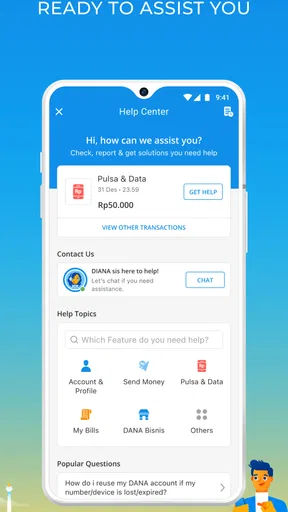
- 24/7 customer support available.
Cons
- Limited international transaction options.
- Occasional app performance lags.
- Requires stable internet connection.
- Some features are region-specific.
- Loyalty rewards can be minimal.
FAQs for DANA Indonesia Digital Wallet
What is DANA Indonesia Digital Wallet?
DANA is a mobile payment app designed to facilitate digital transactions in Indonesia. It allows users to make payments, transfer money, pay bills, and more, all from their smartphones. The app aims to simplify financial transactions by providing a secure and user-friendly platform.
How secure is DANA for financial transactions?
DANA takes security seriously with robust measures such as data encryption and secure login processes. The app requires users to verify their identity and employs two-factor authentication to ensure that all transactions are safe. Additionally, it complies with local regulations to provide maximum security for users' financial data.
Can I use DANA without a bank account?
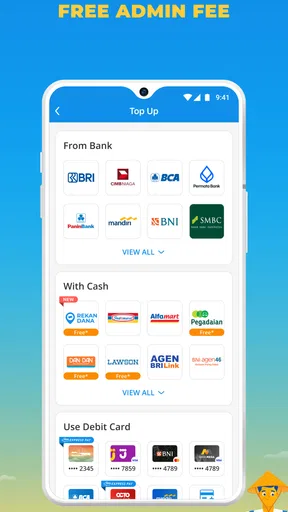
Yes, DANA allows users to create an account without linking a bank account initially. Users can top up their DANA balance through various methods, including retail partners and bank transfers. However, linking a bank account can enhance the user experience by allowing for direct transactions.
What are the main features of DANA?
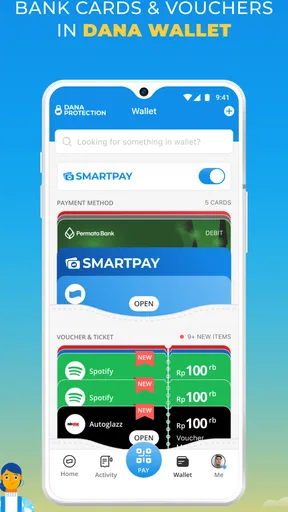
DANA offers a variety of features including mobile top-ups, bill payments, and QR code payments. Users can also transfer money to other DANA users, enjoy cashback offers, and shop online using the app. It integrates with numerous merchants, making it versatile for daily transactions.
Are there any fees associated with using DANA?
DANA is generally free to download and use for standard services. However, certain transactions, like cash withdrawals or specific transfers, might incur fees. It's advisable to check the app for any applicable fees before proceeding with financial transactions to avoid surprises.


